Gear cube Extreme and Ultimate
I still remember when Oskar van Deventer presented the prototype of the Gear Cube the first time on YouTube in the summer of 2009. Back then he called it Caution Cube because one time his finger got stuck between the sharp gears and wounded his fingers. He was wearing protective glasses and gloves while presenting his invention to make sure nobody will get hurt and warned us that this is not a toy and it's extremely dangerous.
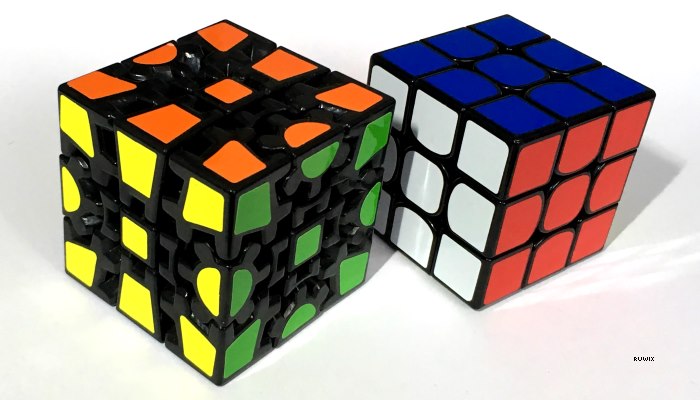
A Gear Cube and a Rubik's Cube
This historical announcement meant the beginning of a new geared puzzle era. Based on his prototype a big variety of geared custom twisty puzzles came to life. We already have Gear Pyraminx, Gear Mastermorphix, the Gear Shift is the 2x2x2 version. The Gear Cube is now mass produced by Mefferts and is available on an affordable price.
The solution of the classic Gear Cube or Caution Cube was not that hard because only 180o turns were allowed so relatively there were not so many possible permutations of the puzzle. The Gear Cube Ultimate and Gear Cube Extreme allows to make 90o turns on two of the faces which makes the puzzle more interesting, making them more popular than their predecessor. The structure of the two puzzles is the same, the only difference is that the Ultimate has stickers on the small edge gears too, requiring one extra step while solving it.
Now let's see how to solve the Gear Cube Extreme and Ultimate. The notation is the same as the Rubik's Cube, we have up, down, left, right, front and back (clockwise rotations marked with U D L R F B) letters. I chose to hold the cube so the top and bottom layers can be rotated 90o so please note that only R2, F2, L2 and B2 moves are allowed because of the structure of the puzzle. I divided the solution into 7 steps, in which the 6th can be skipped if you're solving a GC Extreme.
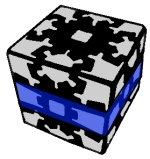
1. Equator (middle) layer
 Intuitive
Turn the R, F, L, B faces until the middle layer edges match the center pieces.
Intuitive
Turn the R, F, L, B faces until the middle layer edges match the center pieces.
2. Top corners
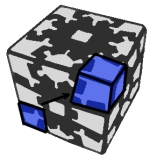 The color of the top and bottom center pieces determine the color of the whole face, just like for the Rubik's Cube. Match two corners on the top then move them to a side and work on the other side not hurting the pieces already solved.
You can solve the top corners intuitive, if not then here's a little help to make it easier. Use this algorithm to move the FLD corner to FRU position.
The color of the top and bottom center pieces determine the color of the whole face, just like for the Rubik's Cube. Match two corners on the top then move them to a side and work on the other side not hurting the pieces already solved.
You can solve the top corners intuitive, if not then here's a little help to make it easier. Use this algorithm to move the FLD corner to FRU position.
D' R2 D R2 D' R2 D' R2
3. Bottom corners
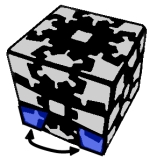 Switch the two bottom front corners using the following algorithm:
R2 U D' R2' - D R2 U' R2' U - R2 U' R2'
4. Top edges to top layer, bottom edges to bottom
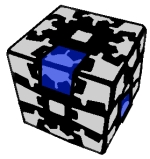 Move every ege to its layer. To make the next step easier try to put them where they belong to.
Switch FU and BR edges:
(R2 U R2' U') x 5
5. Permute edges
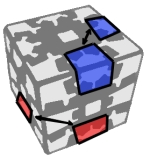
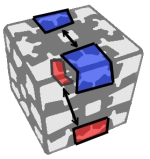 Move every edge where it belongs. The following algorithms manipulate two pieces on the top and two on the bottom layers at the same time.
If they're facing each other use the short algorithm to switch FU with BU and FD with BD:
R4 U2 R4 U2
If they're next to each other switch FU - UR and FD - LD:
R2 D R2 - U2 R4 U2 - R2 D' R2'
6. Edge orientation
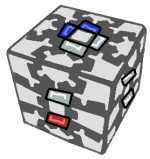 You have to do this step only for the Gear Cube Ultimate to switch the two (marked with blue) next to each other and two in the bottom on the opposite sides (marked with red - one of them is not visible on the back of the cube): LU - BU and FD - BD
(R2 U) x 12
7. Rotate the edges
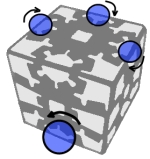 We have to use two similar algorithms to rotate the edges which are going to affect the three upper edges too (LU, FU, RU).
Use the first one to turn the DF edge counterclockwise (picture):
(R2 U) x 2 (R2) x 4 (U' R2') x 2
DF edge clockwise:
(R2 U) x 2 (R2') x 4 (U' R2') x 2
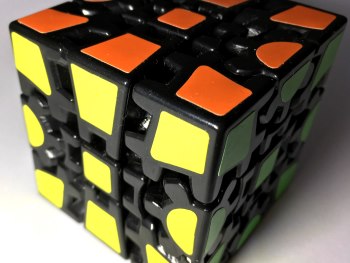
Close-up look